
Command Channel Skill Availability #
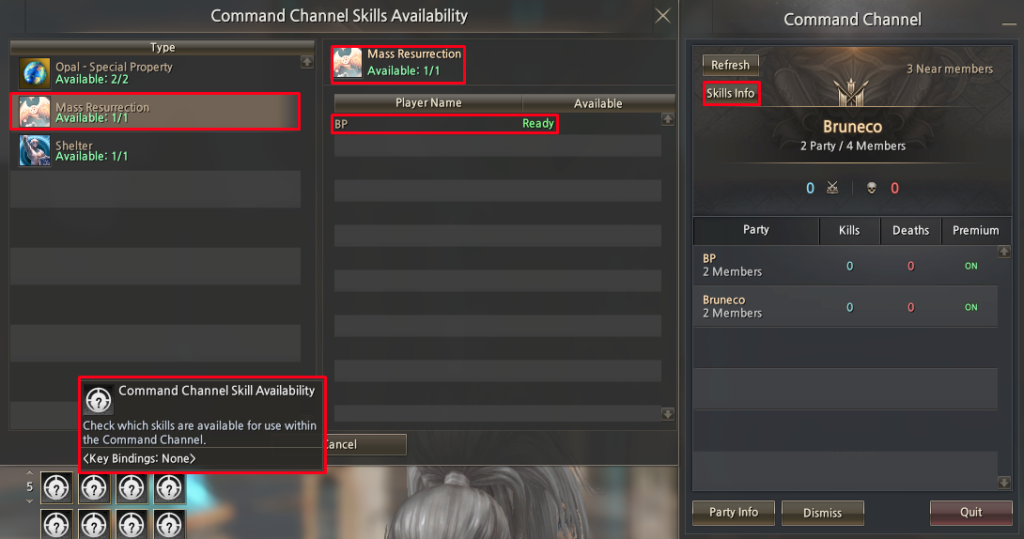
- Command Channel Skill Availability allows the Clan Members to quickly check which Command Channel skills are available and who can use them.
- On the left side, you can see the list of Command Channel skills (such as Mass Resurrection or Shelter) and how many uses are currently available.
- In the center panel, when a skill is selected, the game displays the players who have that skill and their status. If the status is Ready, the skill can be used immediately.
- On the right side, general Command Channel information is shown, including parties, members, and access to this window through the Skills Info button.
Gear Score Ranking #
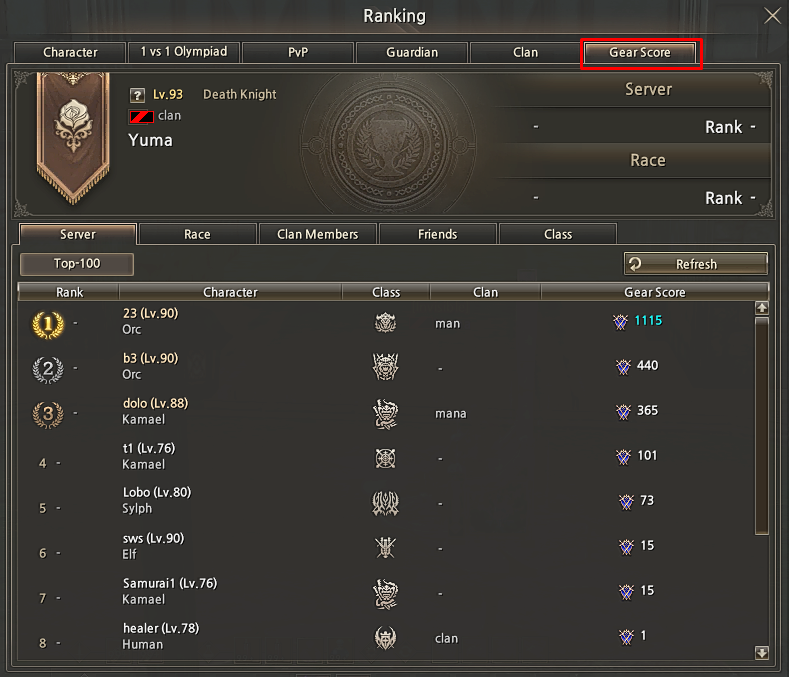
- Gear Score System was created to help both new and experienced players better understand character progression and equipment strength in Pride Essence. Given the game’s complex mechanics, this system provides clear, in-game information in a simple and accessible way.
- Ranking and Player List
- Displays a regularly updated ranking of players based on their Gear Score, reflecting overall progression and performance.
- Gear-Score on Player Interaction
- Allows players to view another character’s Gear Score by selecting them, offering a quick overview of their equipment and progression.
- Item Gear-Score Display
- Shows the Gear Score of each equipped item within the inventory, making it easier to compare and evaluate gear.
Epic Boss Teleport #
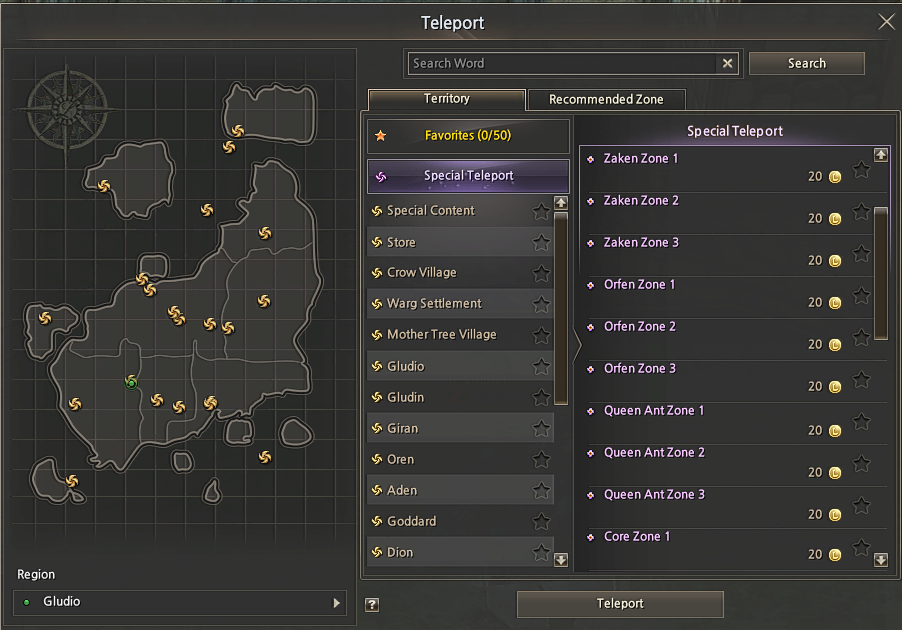
- Epic Boss Teleport System provides direct access to epic boss locations through a centralized interface. Using the ALT+F command, players can select and update teleport points linked to epic encounters.
- The system allows teleport destinations to be adjusted dynamically, ensuring faster access and reducing unnecessary movement across the map. All available epic boss locations are organized within the teleport interface for quick selection.
- This feature improves navigation efficiency and simplifies participation in Epic Boss content.
Enchant Compound Limit #
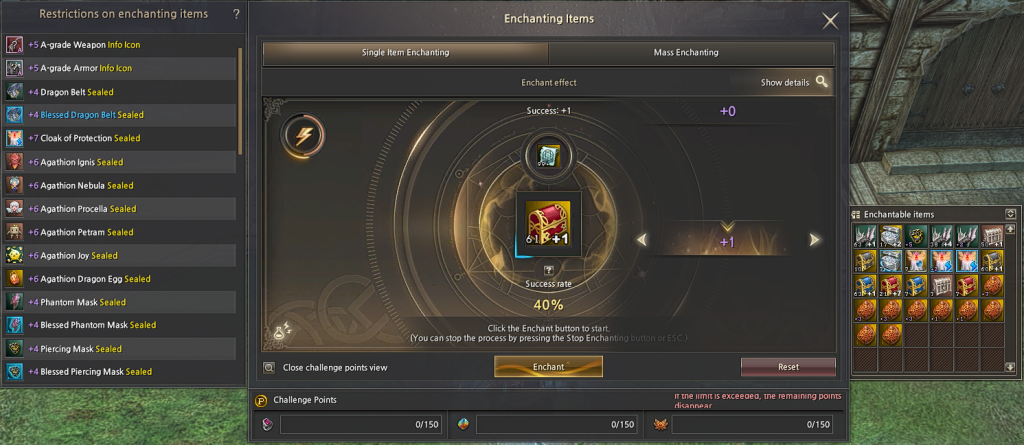
- The CAP Display Enchant System shows the current server enchant limit directly in the Item Enchant interface. When selecting an item to enchant, a red panel displays the maximum allowed enchant level for that server.
- This information is presented in real time, allowing players to clearly identify the enchant cap before proceeding. By making the limit visible within the interface, the system helps prevent confusion and streamlines the enchantment process.
- The CAP Display improves clarity and ensures a more consistent and controlled enchant experience.
Player Inspect #
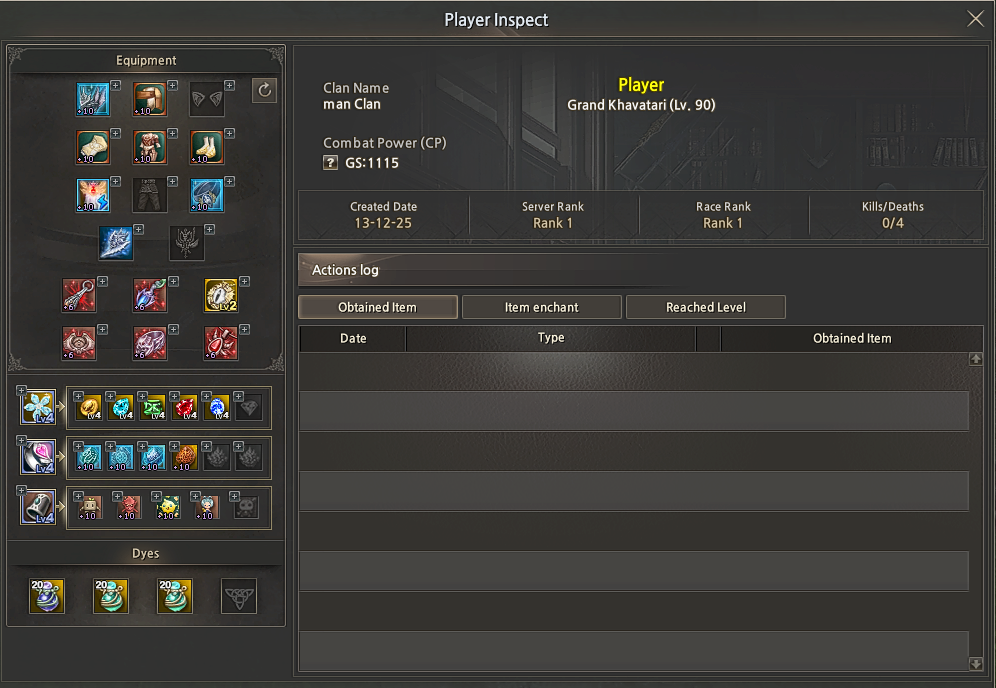
- The Player Inspect feature, accessible through the ALT+B interface, allows players to inspect other characters and view their equipped items in detail. This includes a clear overview of the character’s current gear, enabling easier comparison and evaluation of equipment.
- Only characters that are currently online can be inspected, ensuring that the displayed information is accurate and up to date. The system provides a transparent and reliable way to analyze other players’ setups directly in game.
Clan DKP System #
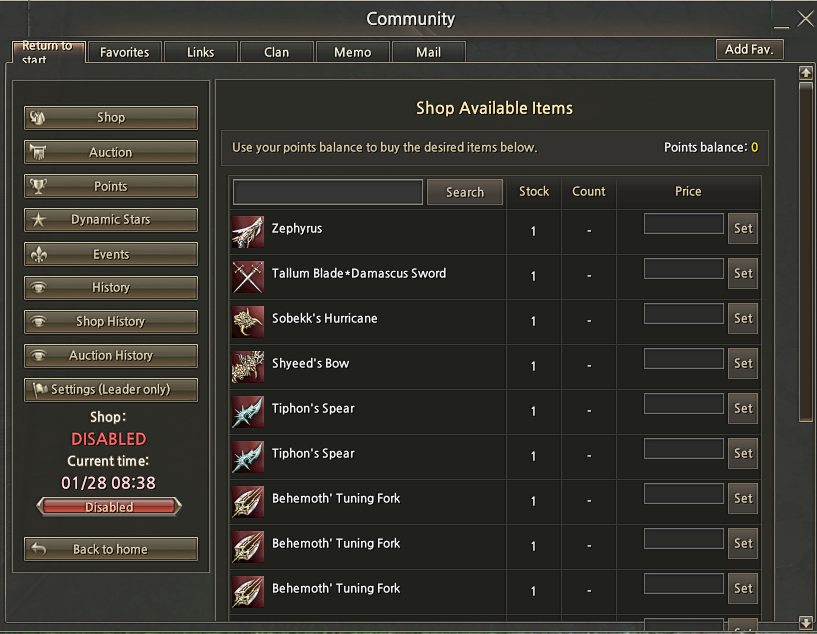
- Clan DKP System is a point-based management system designed to help clan leaders track and reward member participation in clan activities such as battles, events, and quests. Points are accumulated based on contributions and are displayed transparently within the system.
- Members can use their DKP points to acquire items through the Clan DKP Shop, while leaders manage item availability, pricing, and distribution. All point transactions are recorded, ensuring clarity and fairness in reward distribution.
- Clan DKP System establishes a structured method for recognizing member contributions, supporting consistent participation tracking and organized clan management.
- Clan DKP System includes access to Shop, Auction, Points, Dynamic Stars, Events, History, Shop History, and Auction History, providing centralized management and tracking of available systems and interactions.
Doll Extraction System #
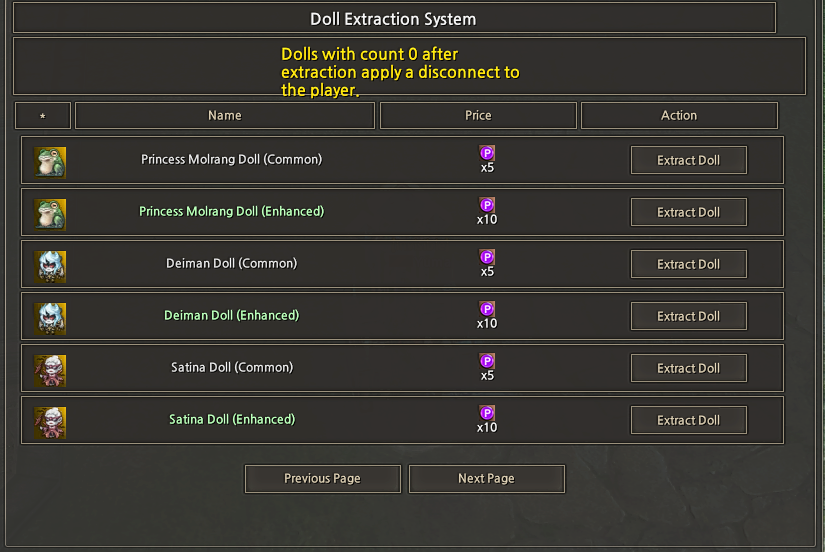
- The Doll Extraction System allows players to extract dolls through the ALT + B by selecting the desired doll and using the Extract Doll option. Each extraction has a defined cost, displayed alongside the doll entry.
- Dolls are listed by name and type, allowing players to clearly identify available options before proceeding. Navigation buttons enable browsing through multiple pages of available dolls.
- Once the extraction process is completed, the player is automatically disconnected to ensure proper synchronization and system consistency.
Element Extraction System #
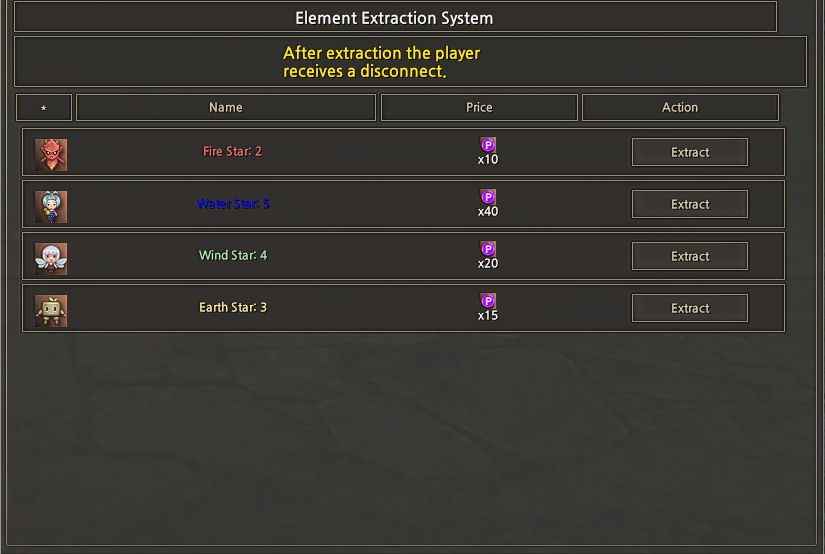
- The Element Extraction System allows players to extract elemental items through the ALT + B by selecting the desired element and using the Extract option. Each extraction has a predefined cost, displayed next to the corresponding element.
- Available elements are listed by name and level, making it easy to identify the item to be extracted before confirming the action. All costs and actions are shown directly in the interface to ensure clarity.
- After completing an extraction, the player is automatically disconnected to ensure proper synchronization and data consistency.
Pattern Extraction System #
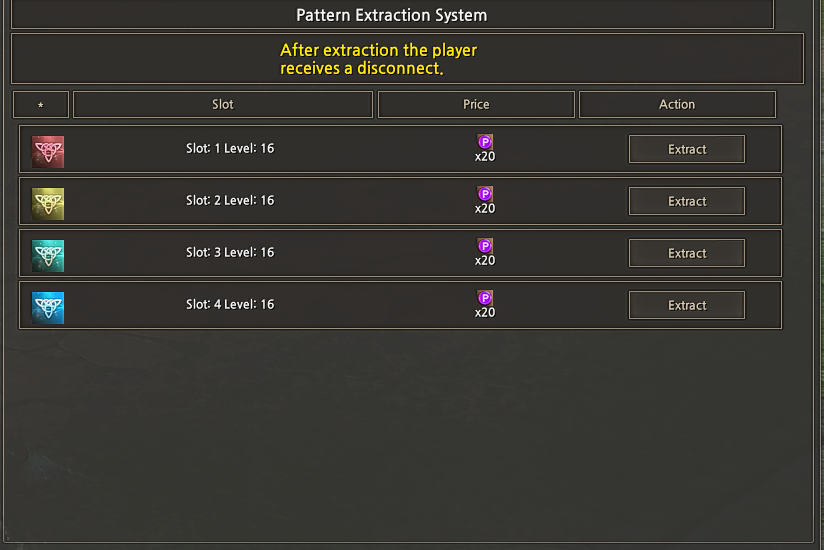
- The Pattern Extraction System enables players to extract pattern slots through the Community interface by selecting the desired slot and using the Extract option. Each extraction has a fixed cost, shown alongside the corresponding slot entry.
- Pattern slots are listed by slot number and level, allowing players to easily identify the available options before proceeding. All required information is clearly displayed within the interface.
- Once the extraction process is completed, the player is automatically disconnected to ensure proper synchronization and system consistency.
Party Window / Clan Combat Power #
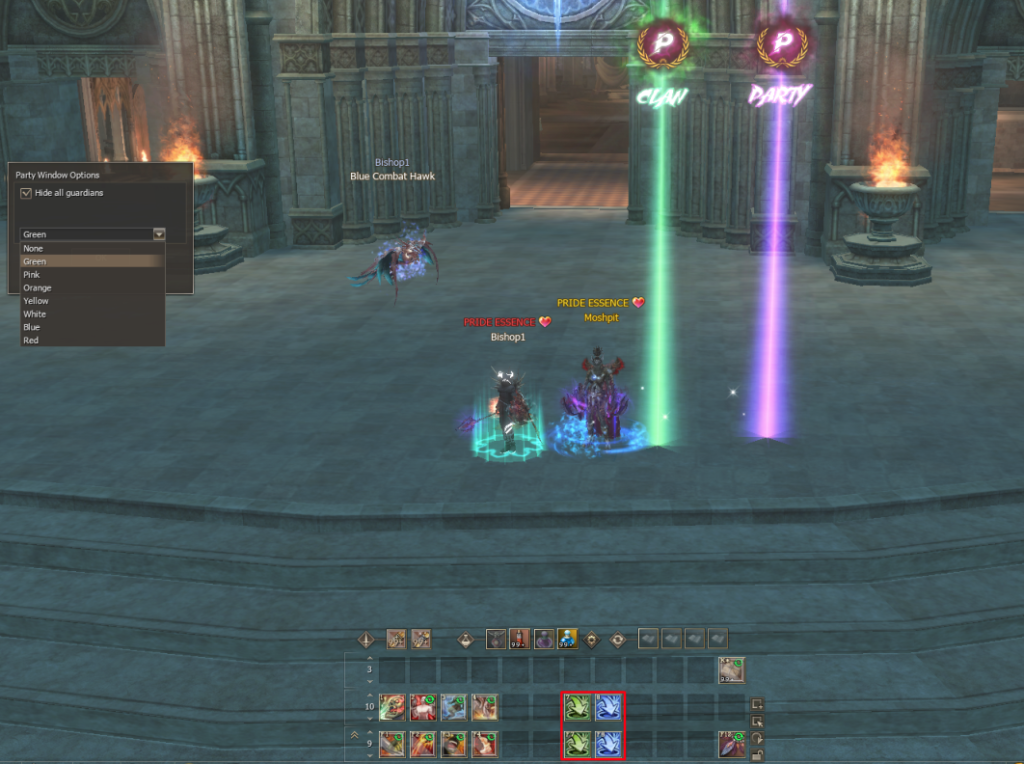
- The Party Window Option allows players to customize the party interface by selecting up to seven different colors, making party members easier to identify during combat, especially in large-scale PvP situations.
- In addition, the Clan Combat Power and Party Combat Power click options provide a clear view of the combat strength of participants. These features support better organization and coordination by allowing leaders and members to monitor group composition more effectively.
Costume Skins System #
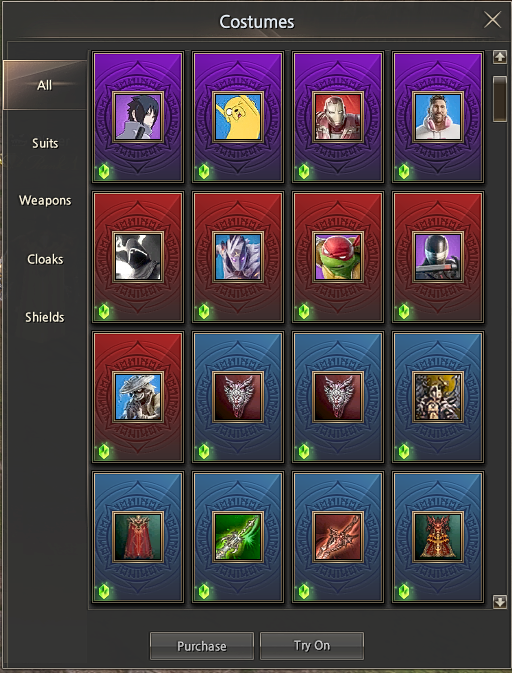
- The Custom Skins System allows players to customize their character’s appearance using a collection of over 100 available skins. Skins can be applied to armor, weapon sets, and cloaks, providing extensive visual customization.
- Before acquiring a skin, players can use the Try On option to preview how it will appear on their character. This allows testing different combinations and adjustments without spending resources until a final decision is made.
Target Priority System #
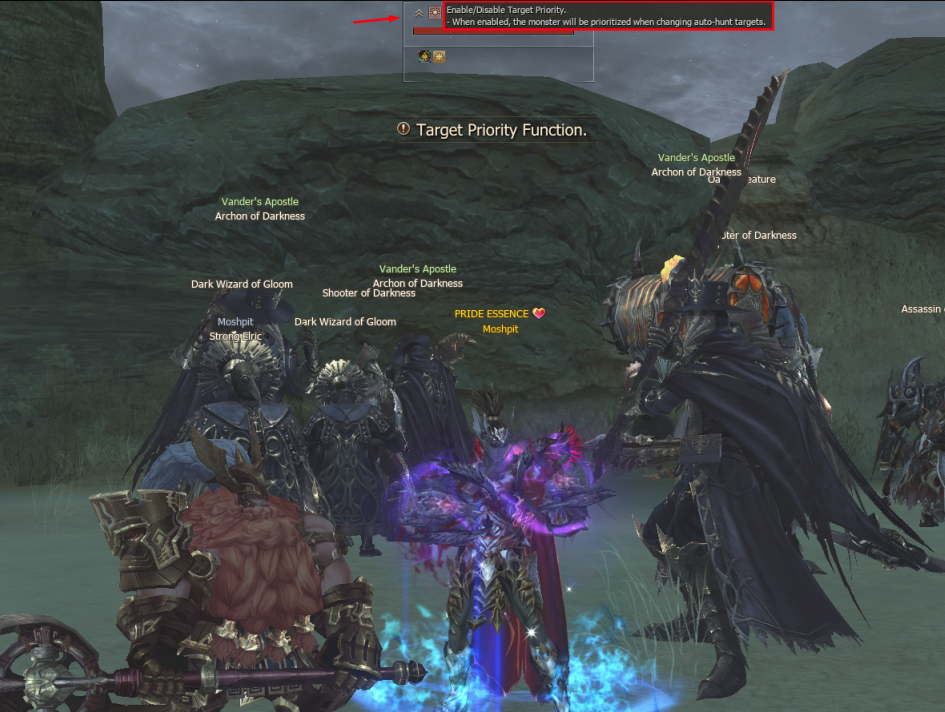
- The Target Priority System allows players to define a specific monster as a priority target. Once a monster is selected and the priority option is activated, any spawn of that monster will automatically be targeted first.
- This system helps optimize gameplay by focusing attacks on selected monsters, reducing unnecessary engagements and improving efficiency during hunting and farming.
Guaranteed Enchant System #
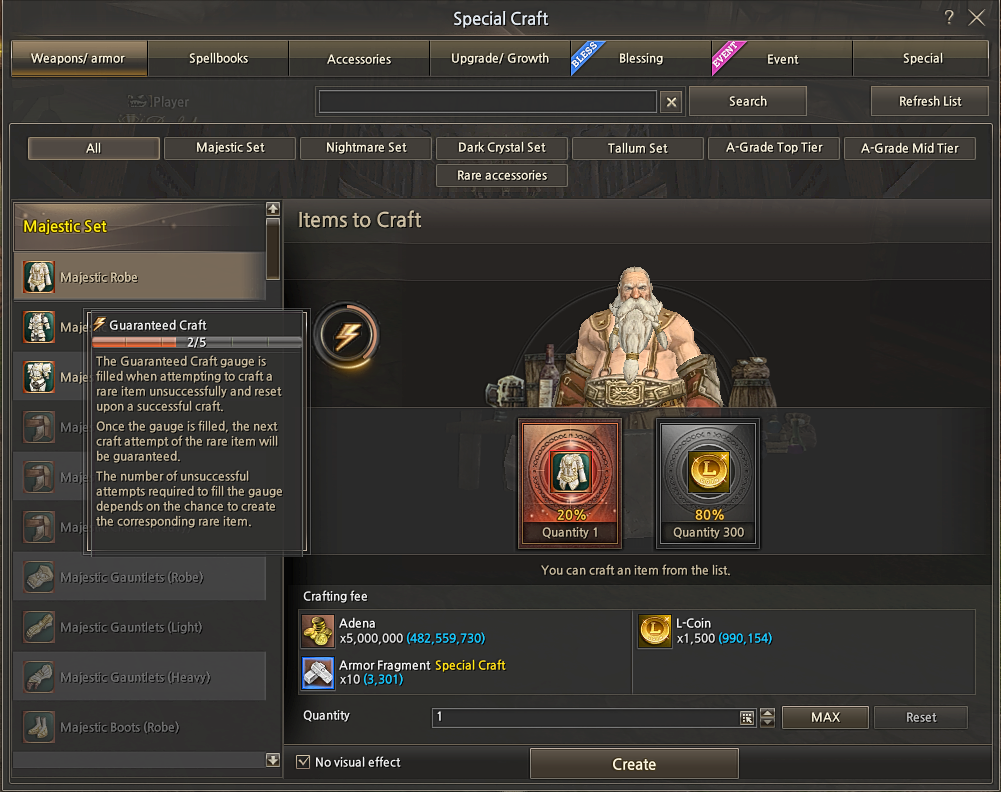
- The Guaranteed Enchant System provides a controlled method for enchanting items, upgrading skills, performing combinations, and using Special Craft. This system ensures that, after a defined number of attempts, the enchantment or enhancement will succeed with 100% certainty.
- The feature applies to item enchants, skill upgrades, compound processes, and crafting operations, reducing the impact of repeated failures. Progress is preserved until the guaranteed success condition is reached.


